DAP Charges
CargoPilot offers an advanced door-to-door functionality, ensuring seamless last-mile deliveries. A DAP charge is required for this final stage, commonly referred to as "to door." While CargoPilot integrates with direct door-to-door API connections, administrators can also manually configure DAP charges within the system, making them available during the quote and booking process.
Managing DAP Charges in the Admin Panel
Administrators can fully manage DAP charges in the Admin Panel, with the ability to:
- Create and modify DAP charges.
- Attach a DAP agent for handling deliveries.
- Configure pre-alert emails to notify relevant stakeholders.
- Set zone restrictions to limit applicable areas.
- Define pricing structures, including minimum, base, rate, and maximum charges.
Please ensure that you have set up the airport to be a DAP airport, otherwise CargoPilot will not recognise the airport to function as DAP airport!
DAP Restrictions
When a DAP airport is added to the Admin Panel (e.g., SYD for Sydney), CargoPilot automatically selects the nearest airport based on the destination search query. However, this can lead to inaccurate DAP solutions in some cases.
For example:
- If a shipment's destination is near BNE (Brisbane) but CargoPilot assigns SYD (Sydney) as the DAP airport, the system may use an airport that is too far away.
To prevent such cases, CargoPilot allows administrators to define a "restriction box," ensuring that only addresses within a predefined area are assigned to a specific DAP charge. This improves accuracy and ensures better routing for door-to-door deliveries.
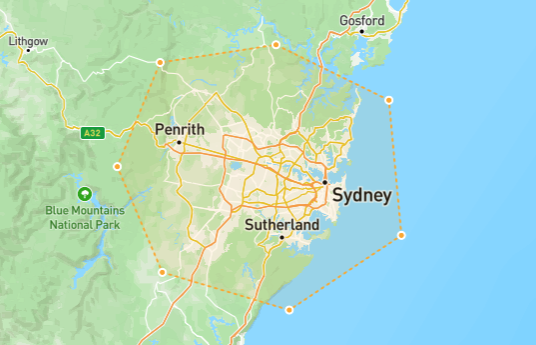
In the example above, the restriction box is set around Sydney. If a search query is made for Gosford, Sydney would typically be assigned as the DAP airport. However, because of the restriction box, Sydney is excluded as an option. On the other hand, if the search query is for Penrith, CargoPilot will assign Sydney as the DAP airport and apply the corresponding DAP charge for the customer.
DAP charge rate sheet
Each DAP charge can be assigned a specific rate structure, allowing for flexible pricing models. The following pricing options are available:
- Custom clearance
- Base rate – The standard flat fee applied to the DAP charge per rate break.
- Rate per kilogram – A dynamic pricing model that calculates costs based on shipment weight.
Creating a DAP charge
- Navigate to the admin panel
- Navigate to
Application management > DAP Charges - Click
Create DAP Chargelocated top-right of the table - Fill in the required fields
- Click
Create DAP Charge
Editing a DAP charge
- Navigate to the admin panel
- Navigate to
Application management > DAP Charges. - Select a DAP charge record
- Click the edit icon, located top-right of the page
- Click
Update DAP Charge
DAP charge example
General fields
Country: USAirport of Destination: JFKCurrency: USDAgent: !ATTACH YOUR OWN!DAP restriction: !MAKE YOUR OWN RESTRICTION!
Rate
Custom Clearance Base: 285All other rates...